Twitter Facebook Delicious Digg Stumbleupon Favorites More

Sunday, 18 June 2017

spinner using xml array list

STRING XML FILE
<resources>
    <string name="app_name">Blog_11_spinner</string>
    <string-array name="friendsname">
        <item>nilesh</item>
        <item>ravi</item>
        <item>VIRAJ</item>
        <item>LOKENDRA</item>
        <item>sachine</item>
    </string-array>
</resources>

JAVA FILE

package com.example.viraj.blog_11_spinner;

import android.support.v7.app.AppCompatActivity;
import android.os.Bundle;
import android.view.View;
import android.widget.AdapterView;
import android.widget.ArrayAdapter;
import android.widget.Spinner;
import android.widget.TextView;
import android.widget.Toast;

public class MainActivity extends AppCompatActivity implements AdapterView.OnItemSelectedListener {

    @Override
    protected void onCreate(Bundle savedInstanceState) {
        super.onCreate(savedInstanceState);
        setContentView(R.layout.activity_main);
        //create the data ,, define apperencelayoutfile yhrough which the adapter pull dtat inside spinner,
        // , define what the user want the used=r click on spiner using onItemSelectedListner
        Spinner spinner = (Spinner) findViewById(R.id.id_name_spinner);
        ArrayAdapter arrayAdapter = ArrayAdapter.createFromResource(this, R.array.friendsname, android.R.layout.simple_spinner_item);
        spinner.setAdapter(arrayAdapter);
        spinner.setOnItemSelectedListener(this);
    }

    @Override
    public void onItemSelected(AdapterView<?> parent, View view, int position, long id) {
        TextView myt1 = (TextView) view;
        Toast.makeText(this, "you seleted" + myt1.getText(), Toast.LENGTH_LONG).show();
    }

    @Override
    public void onNothingSelected(AdapterView<?> parent) {

    }
}

XML FILE

<?xml version="1.0" encoding="utf-8"?>
<android.support.constraint.ConstraintLayout xmlns:android="http://schemas.android.com/apk/res/android"
    xmlns:app="http://schemas.android.com/apk/res-auto"
    xmlns:tools="http://schemas.android.com/tools"
    android:layout_width="match_parent"
    android:layout_height="match_parent"
    tools:context="com.example.viraj.blog_11_spinner.MainActivity">

    <Spinner
        android:id="@+id/id_name_spinner"
        android:layout_width="368dp"
        android:layout_height="wrap_content"
        android:layout_marginBottom="8dp"
        android:layout_marginLeft="8dp"
        android:layout_marginRight="8dp"
        android:layout_marginTop="8dp"
        app:layout_constraintBottom_toBottomOf="parent"
        app:layout_constraintLeft_toLeftOf="parent"
        app:layout_constraintRight_toRightOf="parent"
        app:layout_constraintTop_toTopOf="parent"
        app:layout_constraintVertical_bias="0.212"
     />
</android.support.constraint.ConstraintLayout>


Share:

seekbar android

JAVA FILE

package com.example.viraj.blog_10_seekbar;

import android.support.v7.app.AppCompatActivity;
import android.os.Bundle;
import android.widget.SeekBar;
import android.widget.TextView;
import android.widget.Toast;

public class MainActivity extends AppCompatActivity {
private SeekBar sb1;
    private TextView tv1;
    @Override
    protected void onCreate(Bundle savedInstanceState) {
        super.onCreate(savedInstanceState);
        setContentView(R.layout.activity_main);
        sb1=(SeekBar)findViewById(R.id.id_seekbar);
        tv1=(TextView)findViewById(R.id.id_textView);
        //pahale he 0 /10 display karane ke liye
        tv1.setText("SEEKBAR : " + sb1.getProgress() +"/"+sb1.getMax());

        sb1.setOnSeekBarChangeListener(new SeekBar.OnSeekBarChangeListener() {
            @Override
            public void onProgressChanged(SeekBar seekBar, int progress, boolean fromUser) {
                tv1.setText("SEEKBAR : " + progress +"/"+seekBar.getMax());
            }

            @Override // TRACKING STOP START KUCH BHI TEXT LIKHATE HE 
            public void onStartTrackingTouch(SeekBar seekBar) {
                Toast.makeText(getApplicationContext(),"TRACKING START",Toast.LENGTH_LONG).show();
            }

            @Override
            public void onStopTrackingTouch(SeekBar seekBar) {
                Toast.makeText(getApplicationContext(),"TRACKING STOP",Toast.LENGTH_LONG).show();
            }
        });
    }
}

XML FILE
<?xml version="1.0" encoding="utf-8"?>
<android.support.constraint.ConstraintLayout xmlns:android="http://schemas.android.com/apk/res/android"
    xmlns:app="http://schemas.android.com/apk/res-auto"
    xmlns:tools="http://schemas.android.com/tools"
    android:layout_width="match_parent"
    android:layout_height="match_parent"
    android:background="#FFEB3B"
    tools:context="com.example.viraj.blog_10_seekbar.MainActivity">

    <SeekBar
        android:id="@+id/id_seekbar"
        android:layout_width="300dp"
        android:layout_height="wrap_content"
        tools:layout_editor_absoluteY="229dp"
        android:layout_marginRight="8dp"
        app:layout_constraintRight_toRightOf="parent"
        android:layout_marginLeft="8dp"
        android:max="10"
        app:layout_constraintLeft_toLeftOf="parent" />

    <TextView
        android:id="@+id/id_textView"
        android:layout_width="wrap_content"
        android:layout_height="wrap_content"
        android:text="TextView"
        android:layout_marginRight="8dp"
        app:layout_constraintRight_toRightOf="parent"
        android:layout_marginLeft="8dp"
        app:layout_constraintLeft_toLeftOf="parent"
        android:layout_marginTop="8dp"
        app:layout_constraintTop_toBottomOf="@+id/id_seekbar"
        app:layout_constraintBottom_toBottomOf="parent"
        android:layout_marginBottom="8dp" />
</android.support.constraint.ConstraintLayout>

Share:

Saturday, 17 June 2017

Alert Dialog

STRING FILE

<resources>
    <string name="app_name">Blog_9_alertdialog</string>
    <string name="dialog_title">dialog_title</string>
    <string name="title">TITLE</string>
    <string name="msg">MSG</string>
    <string name="positive">YES</string>
    <string name="negative">NO</string>

</resources>


JAVA FILE

package com.example.viraj.blog_9_alertdialog;

import android.content.DialogInterface;
import android.support.v7.app.AlertDialog;
import android.support.v7.app.AppCompatActivity;
import android.os.Bundle;
import android.widget.Button;

public class MainActivity extends AppCompatActivity {
private Button b1;
    private AlertDialog.Builder di_b1;
    @Override
    protected void onCreate(Bundle savedInstanceState) {
        super.onCreate(savedInstanceState);
        setContentView(R.layout.activity_main);

        di_b1=new AlertDialog.Builder(MainActivity.this);

        //set title to dialog  // or me he ye   di_b1.setTitle("ALERT DIALOG EXAMPLE");
//di_b1.setTitle(R.string.dialog_title);       
 di_b1.setTitle(getResources().getString(R.string.dialog_title));

        //set message or me he ye   di_b1.setMessage("message work"));
        di_b1.setMessage(getResources().getString(R.string.msg));

        //set cancalable outside the dialogbox
        di_b1.setCancelable(false);

        //set positive yes
        di_b1.setPositiveButton(getResources().getString(R.string.positive), new DialogInterface.OnClickListener() {
            @Override
            public void onClick(DialogInterface dialog, int which) {
                //exit our application
                MainActivity.this.finish();
            }
        });
        //set negative
        di_b1.setNegativeButton(getResources().getString(R.string.negative), new DialogInterface.OnClickListener() {
            @Override
            public void onClick(DialogInterface dialog, int which) {
                dialog.cancel();
            }
        });
        //create  dialog di_b1

        AlertDialog alertDialog=di_b1.create();
        //show dialog
        alertDialog.show();
    }
}

XML FILE
<?xml version="1.0" encoding="utf-8"?>
<android.support.constraint.ConstraintLayout xmlns:android="http://schemas.android.com/apk/res/android"
    xmlns:app="http://schemas.android.com/apk/res-auto"
    xmlns:tools="http://schemas.android.com/tools"
    android:layout_width="match_parent"
    android:layout_height="match_parent"
    tools:context="com.example.viraj.blog_9_alertdialog.MainActivity">

    <Button
        android:id="@+id/id_button"
        android:layout_width="wrap_content"
        android:layout_height="wrap_content"
        android:layout_marginBottom="8dp"
        android:layout_marginLeft="8dp"
        android:layout_marginRight="8dp"
        android:layout_marginTop="8dp"
        android:text="Button"
        app:layout_constraintBottom_toBottomOf="parent"
        app:layout_constraintLeft_toLeftOf="parent"
        app:layout_constraintRight_toRightOf="parent"
        app:layout_constraintTop_toTopOf="parent"
        app:layout_constraintVertical_bias="0.501" />
</android.support.constraint.ConstraintLayout>

/////////////=================================OR me he ye ok 

package com.example.viraj.alert_dialog;

import android.content.DialogInterface;
import android.support.v7.app.AlertDialog;
import android.support.v7.app.AppCompatActivity;
import android.os.Bundle;
import android.view.View;
import android.widget.Button;

public class MainActivity extends AppCompatActivity {
private Button showdialogbutton;
private AlertDialog.Builder dialog_12345_name;
    @Override
    protected void onCreate(Bundle savedInstanceState) {
        super.onCreate(savedInstanceState);
        setContentView(R.layout.activity_main);
        showdialogbutton=(Button) findViewById (R.id.id_button);
        showdialogbutton.setOnClickListener(new View.OnClickListener() {
            @Override
            public void onClick(View view) {
                
                //show our alert dialog
                dialog_12345_name=new AlertDialog.Builder(MainActivity.this);

                //set tile
                dialog_12345_name.setTitle("ALERT DIALOG EXAMPLE");

                //SET MESSAGE
                dialog_12345_name.setMessage("MESSAGE IT WORK");

                //SET CANCALABLE outside the dialogbox
                dialog_12345_name.setCancelable(false);

                //dialog hase two button posative yes button and negative no button

                //positive yes button exit our application
                dialog_12345_name.setPositiveButton("YES", new DialogInterface.OnClickListener() {
                    @Override
                    public void onClick(DialogInterface dialogInterface, int i) {
                        MainActivity.this.finish();
                    }
                });

//negative no button our application
                dialog_12345_name.setNegativeButton("NO", new DialogInterface.OnClickListener() {
                    @Override
                    public void onClick(DialogInterface dialogInterface__112233, int i) {
                        dialogInterface__112233.cancel();
                    }
                });

                //create  dialog di_b1
                AlertDialog alertDialog=dialog_12345_name.create();

                //show dialog
                alertDialog.show();
            }
        });

    }
}

Share:

Radio Button Android Studio

JAVA CODE

package com.example.viraj.blog_8_radiobutton;

import android.support.v7.app.AppCompatActivity;
import android.os.Bundle;
import android.view.View;
import android.widget.Button;
import android.widget.RadioButton;
import android.widget.RadioGroup;
import android.widget.TextView;

public class MainActivity extends AppCompatActivity {
private RadioGroup rgp;
    private RadioButton rb;
    private TextView txt1;
    private Button btn;
    @Override
    protected void onCreate(Bundle savedInstanceState) {
        super.onCreate(savedInstanceState);
        setContentView(R.layout.activity_main);
        rgp=(RadioGroup)findViewById(R.id.id_rb_group);
        txt1=(TextView)findViewById(R.id.id_textdisplay) ;
        btn=(Button)findViewById(R.id.id_button);
        btn.setOnClickListener(new View.OnClickListener() {
            @Override
            public void onClick(View v) {
                int abcchecked=rgp.getCheckedRadioButtonId();
                rb=(RadioButton)findViewById(abcchecked);
                txt1.setText(rb.getText());

            }
        });

    }
}

XML CODE
<?xml version="1.0" encoding="utf-8"?>
<android.support.constraint.ConstraintLayout xmlns:android="http://schemas.android.com/apk/res/android"
    xmlns:app="http://schemas.android.com/apk/res-auto"
    xmlns:tools="http://schemas.android.com/tools"
    android:layout_width="match_parent"
    android:layout_height="match_parent"
    tools:context="com.example.viraj.blog_8_radiobutton.MainActivity">


    <RadioGroup
        android:id="@+id/id_rb_group"
        android:layout_width="158dp"
        android:layout_height="151dp"
        android:layout_marginBottom="8dp"
        android:layout_marginLeft="8dp"
        android:layout_marginRight="8dp"
        android:layout_marginTop="8dp"
        app:layout_constraintBottom_toBottomOf="parent"
        app:layout_constraintLeft_toLeftOf="parent"
        app:layout_constraintRight_toRightOf="parent"
        app:layout_constraintTop_toTopOf="parent"
        tools:layout_editor_absoluteX="35dp"
        tools:layout_editor_absoluteY="106dp">

        <RadioButton
            android:id="@+id/id_rb_1"
            android:layout_width="wrap_content"
            android:layout_height="60dp"
            android:text="APPLE" />

        <RadioButton
            android:id="@+id/id_rb_2"
            android:layout_width="wrap_content"
            android:layout_height="51dp"
            android:text="MANGO" />
    </RadioGroup>

    <Button
        android:id="@+id/button"
        android:layout_width="wrap_content"
        android:layout_height="wrap_content"
        android:text="Button" />

    <Button
        android:id="@+id/id_button"
        android:layout_width="wrap_content"
        android:layout_height="wrap_content"
        android:layout_marginBottom="8dp"
        android:layout_marginLeft="8dp"
        android:layout_marginRight="8dp"
        android:layout_marginTop="8dp"
        android:text="Button"
        app:layout_constraintBottom_toTopOf="@+id/id_textdisplay"
        app:layout_constraintLeft_toLeftOf="parent"
        app:layout_constraintRight_toRightOf="parent"
        app:layout_constraintTop_toBottomOf="@+id/id_rb_group" />

    <TextView
        android:id="@+id/id_textdisplay"
        android:layout_width="wrap_content"
        android:layout_height="wrap_content"
        android:text="TextView"
        android:layout_marginRight="8dp"
        app:layout_constraintRight_toRightOf="parent"
        android:layout_marginLeft="8dp"
        app:layout_constraintLeft_toLeftOf="parent"
        app:layout_constraintBottom_toBottomOf="parent"
        android:layout_marginBottom="39dp" />
</android.support.constraint.ConstraintLayout>


Share:

Check box android studio


JAVA FILE 

package com.example.viraj.blog_7_checkbox;

import android.support.v7.app.AppCompatActivity;
import android.os.Bundle;
import android.view.View;
import android.widget.Button;
import android.widget.CheckBox;
import android.widget.TextView;

public class MainActivity extends AppCompatActivity {
private CheckBox c1,c2,c3;
    Button b1;
    TextView t1;
    @Override
    protected void onCreate(Bundle savedInstanceState) {
        super.onCreate(savedInstanceState);
        setContentView(R.layout.activity_main);
        c1=(CheckBox)findViewById(R.id.id_cb1);
        c2=(CheckBox)findViewById(R.id.id_cb2);
        c3=(CheckBox)findViewById(R.id.id_cb3);
t1=(TextView)findViewById(R.id.id_txt) ;
        b1=(Button)findViewById(R.id.id_button);
        b1.setOnClickListener(new View.OnClickListener() {
            @Override
            public void onClick(View v) {
            //STRING BHI LENA HO TO STRING BUILDER LE
                StringBuilder sbr=new StringBuilder();
                //text ko jodne ke liye
                sbr.append(c1.getText().toString()+"STATUS IS" +c1.isChecked()+"\n");
                sbr.append(c2.getText().toString()+"STATUS IS" +c2.isChecked()+"\n");
                sbr.append(c3.getText().toString()+"STATUS IS" +c3.isChecked()+"\n");
                t1.setText(sbr);
            }
        });


    }
}

XML FILE


<?xml version="1.0" encoding="utf-8"?>
<android.support.constraint.ConstraintLayout xmlns:android="http://schemas.android.com/apk/res/android"
    xmlns:app="http://schemas.android.com/apk/res-auto"
    xmlns:tools="http://schemas.android.com/tools"
    android:layout_width="match_parent"
    android:layout_height="match_parent"
    tools:context="com.example.viraj.blog_7_checkbox.MainActivity">

    <CheckBox
        android:id="@+id/id_cb1"
        android:layout_width="wrap_content"
        android:layout_height="wrap_content"
        android:layout_marginLeft="8dp"
        android:layout_marginRight="8dp"
        android:layout_marginTop="47dp"
        android:text="APPLE"
        app:layout_constraintHorizontal_bias="0.501"
        app:layout_constraintLeft_toLeftOf="parent"
        app:layout_constraintRight_toRightOf="parent"
        app:layout_constraintTop_toTopOf="parent" />

    <CheckBox
        android:id="@+id/id_cb2"
        android:layout_width="wrap_content"
        android:layout_height="wrap_content"
        android:layout_marginLeft="8dp"
        android:layout_marginRight="8dp"
        android:layout_marginTop="68dp"
        android:text="MANGO"
        app:layout_constraintLeft_toLeftOf="parent"
        app:layout_constraintRight_toRightOf="parent"
        app:layout_constraintTop_toBottomOf="@+id/id_cb1" />

    <CheckBox
        android:id="@+id/id_cb3"
        android:layout_width="wrap_content"
        android:layout_height="wrap_content"
        android:layout_marginLeft="8dp"
        android:layout_marginRight="8dp"
        android:layout_marginTop="76dp"
        android:text="BANANA"
        app:layout_constraintLeft_toLeftOf="parent"
        app:layout_constraintRight_toRightOf="parent"
        app:layout_constraintTop_toBottomOf="@+id/id_cb2" />

    <Button
        android:id="@+id/id_button"
        android:layout_width="wrap_content"
        android:layout_height="wrap_content"
        android:text="Button"
        android:layout_marginTop="31dp"
        app:layout_constraintTop_toBottomOf="@+id/id_cb3"
        android:layout_marginRight="8dp"
        app:layout_constraintRight_toRightOf="parent"
        android:layout_marginLeft="8dp"
        app:layout_constraintLeft_toLeftOf="parent" />

    <TextView
        android:id="@+id/id_txt"
        android:layout_width="wrap_content"
        android:layout_height="wrap_content"
        android:layout_marginLeft="8dp"
        android:layout_marginRight="8dp"
        android:layout_marginTop="45dp"
        android:text="TextView"
        app:layout_constraintLeft_toLeftOf="parent"
        app:layout_constraintRight_toRightOf="parent"
        app:layout_constraintTop_toBottomOf="@+id/id_button" />
</android.support.constraint.ConstraintLayout>
========================================================================
package com.example.viraj.checkbox;

import android.support.v7.app.AppCompatActivity;
import android.os.Bundle;
import android.view.View;
import android.widget.Button;
import android.widget.CheckBox;
import android.widget.RadioButton;
import android.widget.Toast;

public class MainActivity extends AppCompatActivity {
Button button;
    CheckBox dog,cat,horse;
    @Override
    protected void onCreate(Bundle savedInstanceState) {
        super.onCreate(savedInstanceState);
        setContentView(R.layout.activity_main);
        button=(Button)findViewById(R.id.id_button);
        dog=(CheckBox)findViewById(R.id.id_dog);
        cat=(CheckBox)findViewById(R.id.id_cat);
        horse=(CheckBox)findViewById(R.id.id_horse);
        button.setOnClickListener(new View.OnClickListener() {
            @Override
            public void onClick(View view) {
                if (dog.isChecked() && cat.isChecked())
                {
                    Toast.makeText(getApplicationContext(),"its dog and Cat",Toast.LENGTH_LONG).show();
                }
                else if (dog.isChecked() )
                {
                    Toast.makeText(getApplicationContext(),"its dog ",Toast.LENGTH_LONG).show();
                }
                else if ( cat.isChecked())
                {
                    Toast.makeText(getApplicationContext(),"its  Cat",Toast.LENGTH_LONG).show();
                }
            }
        });
    }
}


==================================================================================================================================================
ANOTHER EXAMPLE IMAGE
YES OR NO TYPE
hhhhhhhhhhhhhhhhhhhhhhhhhhhhhhhh


Share:

Toggle Button Android

JAVA FILE

package com.example.viraj.blog_6_togglebutton;

import android.support.v7.app.AppCompatActivity;
import android.os.Bundle;
import android.view.View;
import android.widget.CompoundButton;
import android.widget.TextView;
import android.widget.ToggleButton;

public class MainActivity extends AppCompatActivity {
private TextView showtext;
    private ToggleButton tgb1;
    @Override
    protected void onCreate(Bundle savedInstanceState) {
        super.onCreate(savedInstanceState);
        setContentView(R.layout.activity_main);
        tgb1=(ToggleButton)findViewById(R.id.id_toggleButton);
        showtext=(TextView)findViewById(R.id.id_2_textView);
        tgb1.setOnCheckedChangeListener(new CompoundButton.OnCheckedChangeListener() {
            @Override
            public void onCheckedChanged(CompoundButton buttonView, boolean isChecked) {
                if (isChecked)
                {
                    showtext.setVisibility(View.VISIBLE);
                    showtext.setText("visible");
                }
                else
                {
                    showtext.setVisibility(View.INVISIBLE);
                }
            }
        });
    }
}

XML FILE

<?xml version="1.0" encoding="utf-8"?>
<android.support.constraint.ConstraintLayout xmlns:android="http://schemas.android.com/apk/res/android"
    xmlns:app="http://schemas.android.com/apk/res-auto"
    xmlns:tools="http://schemas.android.com/tools"
    android:layout_width="match_parent"
    android:layout_height="match_parent"
    tools:context="com.example.viraj.blog_6_togglebutton.MainActivity">

    <TextView
        android:layout_width="wrap_content"
        android:layout_height="wrap_content"
        android:layout_marginLeft="8dp"
        android:layout_marginRight="8dp"
        android:layout_marginTop="8dp"
        android:text="TOGGLE BUTTON ON OFF"
        android:textSize="24sp"
        app:layout_constraintBottom_toBottomOf="parent"
        app:layout_constraintHorizontal_bias="0.451"
        app:layout_constraintLeft_toLeftOf="parent"
        app:layout_constraintRight_toRightOf="parent"
        app:layout_constraintTop_toTopOf="parent"
        app:layout_constraintVertical_bias="0.095"
        android:id="@+id/textView" />

    <ToggleButton
        android:id="@+id/id_toggleButton"
        android:layout_width="wrap_content"
        android:layout_height="wrap_content"
        android:text="ToggleButton"
        android:layout_marginLeft="8dp"
        app:layout_constraintLeft_toLeftOf="parent"
        android:layout_marginRight="8dp"
        app:layout_constraintRight_toRightOf="parent"
        android:layout_marginTop="128dp"
        app:layout_constraintTop_toBottomOf="@+id/textView"
        app:layout_constraintHorizontal_bias="0.521" />

    <TextView
        android:id="@+id/id_2_textView"
        android:layout_width="wrap_content"
        android:layout_height="wrap_content"
        android:text="TextView"
        android:textSize="24sp"
        android:visibility="invisible"
        android:layout_marginTop="90dp"
        app:layout_constraintTop_toBottomOf="@+id/id_toggleButton"
        android:layout_marginRight="8dp"
        app:layout_constraintRight_toRightOf="parent"
        android:layout_marginLeft="8dp"
        app:layout_constraintLeft_toLeftOf="parent" />

</android.support.constraint.ConstraintLayout>


Share:

custom toast android

 1)main xml
2 ) create another tost.xml file

java file
package com.example.viraj.blog_5_custom_tost;

import android.support.v7.app.AppCompatActivity;
import android.os.Bundle;
import android.view.Gravity;
import android.view.View;
import android.view.ViewGroup;
import android.widget.Button;
import android.widget.Toast;

public class MainActivity extends AppCompatActivity {

    @Override
    protected void onCreate(Bundle savedInstanceState) {
        super.onCreate(savedInstanceState);
        setContentView(R.layout.activity_main);
        Button button=(Button)findViewById(R.id.id_button);
        button.setOnClickListener(new View.OnClickListener() {
            @Override
            public void onClick(View v) {
//===============================================================================================
                ////layout inflator ka instance create karange
              //  LayoutInflater l1 = getLayoutInflater();
                //Getting the View object as defined in the tost.xml file jo create ki he
                //View layout = l1.inflate(R.layout.tost,
                      //  (ViewGroup) findViewById(R.id.tostxml));
                //tost name ka xml page he aur uss me tostxml layout ki id he

  //==============================================================================================
               View layout=getLayoutInflater().inflate(R.layout.tost, (ViewGroup)findViewById(R.id.tostxml) );

                Toast toast=new Toast(getApplicationContext());

                toast.setDuration(Toast.LENGTH_LONG);
                toast.setGravity(Gravity.CENTER,0,0);
                toast.setView(layout);
                toast.show();
            }
        });
    }
}

xml second   toast.xml

<?xml version="1.0" encoding="utf-8"?>
<LinearLayout xmlns:android="http://schemas.android.com/apk/res/android"
    xmlns:app="http://schemas.android.com/apk/res-auto"
    android:orientation="vertical" android:layout_width="match_parent"
    android:layout_height="match_parent"
    android:id="@+id/tostxml">

    <ImageView
        android:id="@+id/imageView"
        android:layout_width="match_parent"
        android:layout_height="wrap_content"
        app:srcCompat="@drawable/maxresdefault" />
</LinearLayout>


main xml

<?xml version="1.0" encoding="utf-8"?>
<android.support.constraint.ConstraintLayout xmlns:android="http://schemas.android.com/apk/res/android"
    xmlns:app="http://schemas.android.com/apk/res-auto"
    xmlns:tools="http://schemas.android.com/tools"
    android:layout_width="match_parent"
    android:layout_height="match_parent"
    tools:context="com.example.viraj.blog_5_custom_tost.MainActivity">

    <Button
        android:id="@+id/id_button"
        android:layout_width="wrap_content"
        android:layout_height="wrap_content"
        android:layout_marginBottom="35dp"
        android:layout_marginLeft="8dp"
        android:layout_marginRight="8dp"
        android:text="Button"
        app:layout_constraintBottom_toBottomOf="parent"
        app:layout_constraintLeft_toLeftOf="parent"
        app:layout_constraintRight_toRightOf="parent" />
</android.support.constraint.ConstraintLayout>

Share:

Tost Message on button click

java file
package com.example.viraj.blog_4_tostmessage;

import android.support.v7.app.AppCompatActivity;
import android.os.Bundle;
import android.view.View;
import android.widget.Button;
import android.widget.Toast;

public class MainActivity extends AppCompatActivity {

    @Override
    protected void onCreate(Bundle savedInstanceState) {
        super.onCreate(savedInstanceState);
        setContentView(R.layout.activity_main);
        Button B1=(Button)findViewById(R.id.id_button);
        B1.setOnClickListener(new View.OnClickListener() {
            @Override
            public void onClick(View v) {
                Toast.makeText(MainActivity.this,"TOST IS WORKING",Toast.LENGTH_LONG).show();
            }
        });
    }
}

xml file

<?xml version="1.0" encoding="utf-8"?>
<android.support.constraint.ConstraintLayout xmlns:android="http://schemas.android.com/apk/res/android"
    xmlns:app="http://schemas.android.com/apk/res-auto"
    xmlns:tools="http://schemas.android.com/tools"
    android:layout_width="match_parent"
    android:layout_height="match_parent"
    tools:context="com.example.viraj.blog_4_tostmessage.MainActivity">

    <Button
        android:id="@+id/id_button"
        android:layout_width="wrap_content"
        android:layout_height="wrap_content"
        android:layout_marginBottom="8dp"
        android:layout_marginLeft="8dp"
        android:layout_marginRight="8dp"
        android:layout_marginTop="8dp"
        android:text="CLICK TO DISPLAY TOST MESAGE"
        app:layout_constraintBottom_toBottomOf="parent"
        app:layout_constraintLeft_toLeftOf="parent"
        app:layout_constraintRight_toRightOf="parent"
        app:layout_constraintTop_toTopOf="parent" />
</android.support.constraint.ConstraintLayout>


Share:

Sum of two no android edit text button textview

java file

package com.example.viraj.blog_3_sumof2number;

import android.support.v7.app.AppCompatActivity;
import android.os.Bundle;
import android.view.View;
import android.widget.Button;
import android.widget.EditText;
import android.widget.TextView;

public class MainActivity extends AppCompatActivity {
    private EditText e1;
    private EditText e2;
    private TextView txt;
    private Button b1;

    @Override
    protected void onCreate(Bundle savedInstanceState) {
        super.onCreate(savedInstanceState);
        setContentView(R.layout.activity_main);
        e1 = (EditText) findViewById(R.id.id_noone);
        e2 = (EditText) findViewById(R.id.id_no2);
        txt = (TextView) findViewById(R.id.id_answer);
b1=(Button)findViewById(R.id.id_button) ;

        b1.setOnClickListener(new View.OnClickListener() {
            @Override
            public void onClick(View v) {

                String gettexte1 = e1.getText().toString();
                String gettexte2 = e2.getText().toString();

                int v1 = Integer.parseInt(gettexte1);
                int v2 = Integer.parseInt(gettexte2);

                int total = v1 + v2;
                txt.setText(Integer.toString(total));
            }
        });

    }
}


xml file

<?xml version="1.0" encoding="utf-8"?>
<android.support.constraint.ConstraintLayout xmlns:android="http://schemas.android.com/apk/res/android"
    xmlns:app="http://schemas.android.com/apk/res-auto"
    xmlns:tools="http://schemas.android.com/tools"
    android:layout_width="match_parent"
    android:layout_height="match_parent"
    tools:context="com.example.viraj.blog_3_sumof2number.MainActivity">

    <EditText
        android:id="@+id/id_noone"
        android:layout_width="wrap_content"
        android:layout_height="wrap_content"
        android:ems="10"
        android:inputType="textPersonName"
        android:hint="enter text 1"
        android:layout_marginLeft="8dp"
        app:layout_constraintLeft_toLeftOf="parent"
        android:layout_marginRight="8dp"
        app:layout_constraintRight_toRightOf="parent"
        app:layout_constraintTop_toTopOf="parent"
        android:layout_marginTop="114dp"
        app:layout_constraintHorizontal_bias="0.431" />

    <EditText
        android:id="@+id/id_no2"
        android:layout_width="wrap_content"
        android:layout_height="wrap_content"
        android:ems="10"
        android:inputType="textPersonName"
        android:hint="enter text 2"
        android:layout_marginLeft="8dp"
        app:layout_constraintLeft_toLeftOf="parent"
        android:layout_marginRight="8dp"
        app:layout_constraintRight_toRightOf="parent"
        android:layout_marginTop="63dp"
        app:layout_constraintTop_toBottomOf="@+id/id_noone"
        app:layout_constraintHorizontal_bias="0.431" />

    <Button
        android:id="@+id/id_button"
        android:layout_width="wrap_content"
        android:layout_height="wrap_content"
        android:layout_marginTop="92dp"
        android:text="Button"
        app:layout_constraintTop_toBottomOf="@+id/id_no2"
        tools:layout_editor_absoluteX="148dp" />

    <TextView
        android:id="@+id/id_answer"
        android:layout_width="wrap_content"
        android:layout_height="wrap_content"
        android:layout_marginBottom="8dp"
        android:layout_marginLeft="8dp"
        android:layout_marginRight="8dp"
        android:layout_marginTop="8dp"
        android:textSize="24sp"
        app:layout_constraintBottom_toBottomOf="parent"
        app:layout_constraintLeft_toLeftOf="parent"
        app:layout_constraintRight_toRightOf="parent"
        app:layout_constraintTop_toBottomOf="@+id/id_button" />
</android.support.constraint.ConstraintLayout>


Share:

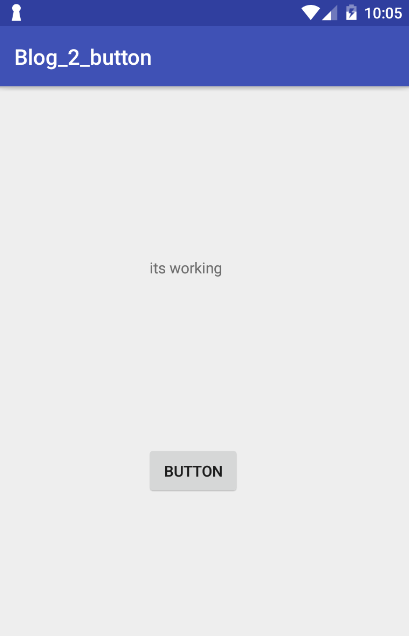
android button set text on click listner

JAVA FILE
package com.example.viraj.blog_2_button;

import android.support.v7.app.AppCompatActivity;
import android.os.Bundle;
import android.view.View;
import android.widget.Button;
import android.widget.TextView;

public class MainActivity extends AppCompatActivity {
private Button b1;
    private TextView t1;
    @Override
    protected void onCreate(Bundle savedInstanceState) {
        super.onCreate(savedInstanceState);
        setContentView(R.layout.activity_main);
        //type cast
        t1=(TextView)findViewById(R.id.id_text);
        b1=(Button)findViewById(R.id.id_button);

        //set on click listner
        b1.setOnClickListener(new View.OnClickListener() {
            @Override
            public void onClick(View v) {
                t1.setText("its working");
            }
        });

    }
}
XML FILE
<?xml version="1.0" encoding="utf-8"?><android.support.constraint.ConstraintLayout xmlns:android="http://schemas.android.com/apk/res/android"    xmlns:app="http://schemas.android.com/apk/res-auto"    xmlns:tools="http://schemas.android.com/tools"    android:layout_width="match_parent"    android:layout_height="match_parent"    tools:context="com.example.viraj.blog_2_button.MainActivity">

    <TextView        android:id="@+id/id_text"        android:layout_width="wrap_content"        android:layout_height="wrap_content"        android:text="Hello World!"        app:layout_constraintBottom_toBottomOf="parent"        app:layout_constraintLeft_toLeftOf="parent"        app:layout_constraintRight_toRightOf="parent"        app:layout_constraintTop_toTopOf="parent"        app:layout_constraintHorizontal_bias="0.445"        app:layout_constraintVertical_bias="0.311"        android:layout_marginRight="8dp"        android:layout_marginLeft="8dp"        android:layout_marginTop="8dp" />

    <Button        android:id="@+id/id_button"        android:layout_width="wrap_content"        android:layout_height="wrap_content"        android:text="Button"        android:layout_marginTop="155dp"        app:layout_constraintTop_toBottomOf="@+id/id_text"        android:layout_marginRight="8dp"        app:layout_constraintRight_toRightOf="parent"        android:layout_marginLeft="8dp"        app:layout_constraintLeft_toLeftOf="parent"        app:layout_constraintHorizontal_bias="0.464" />

</android.support.constraint.ConstraintLayout>

Share:

Android Text view set message

JAVA FILE
package com.example.viraj.blog_1_textview;
import android.support.v7.app.AppCompatActivity;import android.os.Bundle;import android.widget.TextView;
public class MainActivity extends AppCompatActivity {private TextView t1;
    @Override    protected void onCreate(Bundle savedInstanceState) {
        super.onCreate(savedInstanceState);
        setContentView(R.layout.activity_main);
        t1=(TextView)findViewById(R.id.id_text);
        t1.setText("HELLO WORLD TEXT VIEW SET SUCESSFULLY");
    }
}


XML FILE
<?xml version="1.0" encoding="utf-8"?>
<android.support.constraint.ConstraintLayout xmlns:android="http://schemas.android.com/apk/res/android"
    xmlns:app="http://schemas.android.com/apk/res-auto"
    xmlns:tools="http://schemas.android.com/tools"
    android:layout_width="match_parent"
    android:layout_height="match_parent"
    tools:context="com.example.viraj.blog_1_textview.MainActivity">

    <TextView
        android:id="@+id/id_text"
        android:layout_width="wrap_content"
        android:layout_height="wrap_content"
        android:text="Hello World!"
        app:layout_constraintBottom_toBottomOf="parent"
        app:layout_constraintLeft_toLeftOf="parent"
        app:layout_constraintRight_toRightOf="parent"
        app:layout_constraintTop_toTopOf="parent" />

</android.support.constraint.ConstraintLayout>


Share:

android screen orientation set

androidmainfest.xml


<?xml version="1.0" encoding="utf-8"?><manifest xmlns:android="http://schemas.android.com/apk/res/android"    package="com.example.viraj.ttest">

    <application        android:allowBackup="true"        android:icon="@mipmap/ic_launcher"        android:label="@string/app_name"        android:roundIcon="@mipmap/ic_launcher_round"        android:supportsRtl="true"        android:theme="@style/AppTheme">
        <activity android:name=".MainActivity"            android:screenOrientation="portrait"
            >
            <intent-filter>
                <action android:name="android.intent.action.MAIN" />

                <category android:name="android.intent.category.LAUNCHER" />
            </intent-filter>
        </activity>
    </application>

</manifest>
Share:

Thursday, 15 June 2017

SPLASH SCREEN


PASTE ON NEW SPLASE ACTIVITY PAGE      

@Overrideprotected void onCreate(Bundle savedInstanceState) {
    super.onCreate(savedInstanceState);
    setContentView(R.layout.activity_splash_screen);

    new Handler().postDelayed(new Runnable() {
                                  @Override                                  public void run() {
                                      Intent intent = new Intent(getApplicationContext(), MainActivity.class);
                                      startActivity(intent);
                                      finish();
                                  }
                              }
            , 3000);
}


==============================================================
<activity android:name=".MainActivity"
    >
    <intent-filter>
        <action android:name="android.intent.action.MAIN"
            />

        <category android:name="android.intent.category.DEFAULT" />
    </intent-filter>

</activity>

<activity android:name=".SplashScreenActivity">
    <intent-filter>
        <action android:name="android.intent.action.MAIN"
            />

        <category android:name="android.intent.category.LAUNCHER" />
    </intent-filter>

</activity>
Share:

Search This Blog

Popular Posts

Pages

how to make crores from 1 lakh in stock markets in 1 year

how to make crores from 1 lakh in stock markets in 1 year

Blogger Tutorials

Blogger Templates

Sample Text

Copyright © ANDROID TUTORIAL CODE | Powered by Blogger
Design by SimpleWpThemes | Blogger Theme by NewBloggerThemes.com & Distributed By Protemplateslab